
Share article
Redesign Without Losing SEO: What to Check Before Launch and After Migration
Send via messenger or social network
Redesign Without Losing SEO: What to Check Before Launch and After Migration

How to map old and new URLs, migrate content and approve the launch. A checklist for website owners and development teams.

During a redesign, it is often not only the layouts that change, but also page URLs, catalog structure, forms, and the CMS. At the same time, old links continue to work in search results, emails, and customers’ bookmarks. Before launch, you need to decide where each of them will lead.
Pages that generate inquiries require special attention: categories, services, popular products, and pre-purchase guides. Their content and purpose should be agreed before the designer finishes the mockups.
Below is the migration workflow for a warehouse equipment supplier’s website: inventory, URL map, test version acceptance, and release monitoring. Even with a correct migration, search visibility may fluctuate; the team’s task is to eliminate its own errors and spot deviations in time.
1. First, define the scope of the changes
The word “redesign” can cover very different projects. In one case, it means changing colors and the placement of blocks. In another, it means moving to a new CMS, reducing the catalog, renaming sections, and changing the domain all at once. The set of checks will be different.
| What is changing | What to pay attention to |
|---|---|
| Design only | Content, navigation, mobile user journey, forms, and speed |
| Structure and URLs | Mapping old pages to new ones, redirects, internal links |
| CMS and templates | Generation of URLs, SEO fields, meta tags, statuses, and the sitemap |
| Domain | Additionally, confirming the move in search engine tools |
| Catalog and product range | Preserving useful categories, the future of products, filters, and documents |
Create this list together with the developer. Document the changes for each item, including those visitors will not see. Even if the design stays the same, a new CMS may process URLs differently or return an empty template for a non-existent URL.
Google recommends separating major changes where possible and warns about temporary visibility fluctuations during a site move. So do not combine a domain change, CMS migration, and structure change just to hit a single release date if the stages can reasonably be separated. Google’s site move recommendations (opens in a new tab).
2. Capture the current state of the live website
Before design begins, collect the source data. You need a list of pages with their objectives, not just a screenshot of the homepage. Include categories, services, products, articles, images, and documents that customers use.
To set priorities, add search traffic, inquiries, external links, and the page’s value to the business. A low-traffic page may answer an important question before a high-value purchase. You cannot decide to delete it based only on visits over the past month.
| Working table field | Why it is needed |
|---|---|
| Old URL and page type | To find the object and its template |
| Purpose | Understand which visitor task to preserve |
| Search data for a comparable period | Assess the page’s role and seasonality |
| Inquiries or another valuable action | Don’t limit yourself to page views |
| Decision for the page | Keep, migrate, merge, or delete |
| Owner | Assign someone to confirm the decision |
Export the headings, descriptions, tables, and documents from priority pages. Use this copy to check the migration: whether the category content has been preserved, whether the instructions are still there, and whether the product parameters are in place. Mark editor-approved changes in the same spreadsheet.
Separately record the analytics settings and goal definitions. If you replace the design and the way leads are counted at the same time, it will be harder to compare before and after. A change history is worth keeping even for a small project.
3. Agree on the structure before final layouts
During the design review, go through three journeys: the buyer chooses a solution, compares the terms, and gets in touch. For a warehouse equipment store, this might include selecting a type of racking, checking specifications, and requesting a quote.
Show the designer real long names, tables, several card states, and service restrictions. A layout based on ideal short copy often hides issues that appear once the content is uploaded.
Don’t hide useful terms just to keep the first screen clean if there is no agreed place for them. You can change the order and presentation or move details into expandable blocks, but the buyer must be able to find answers in the right context.
At this stage, also decide how the editor will maintain the information after launch. If a developer is needed to update every parameter, keeping the catalog up to date will become a separate project.
4. Make a decision for each old address
Prepare a mapping table for any URLs that will change. Don’t stop at the phrase “set up redirects”: it does not make clear which pages should lead where.
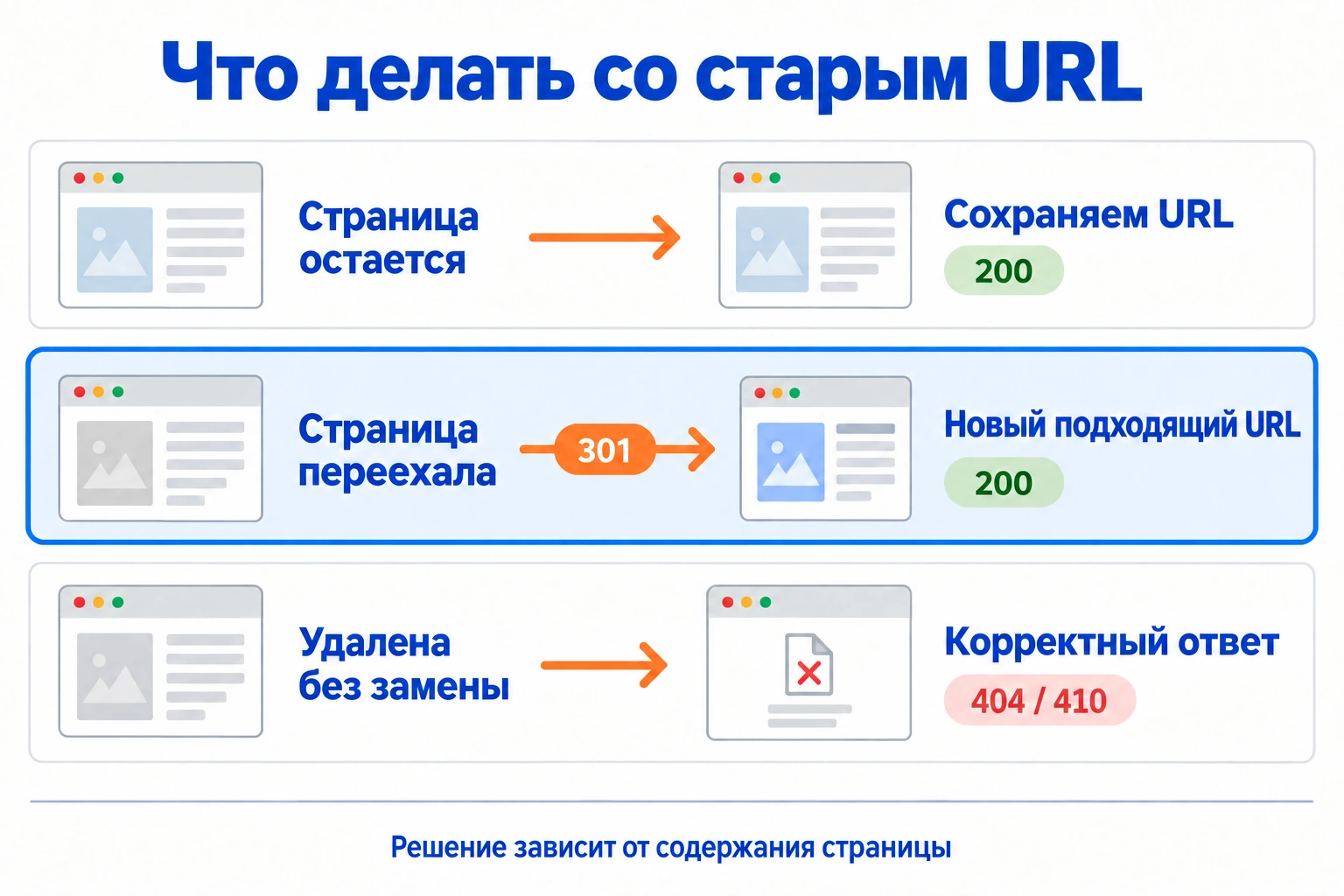
| Old address | Solution | Expected result |
|---|---|---|
/catalog/archive/ |
The address and purpose are preserved | A working page with up-to-date content |
/goods/rack-a/ |
The same product has moved to /catalog/rack-a/ |
Permanent redirect to the new product card |
/services/assembly-old/ |
The material has been included in the new installation page | Redirect to a page with corresponding content |
/promo/old-event/ |
The event has been deleted, and there is no useful replacement | A justified 404 or 410 response |
The table shows four typical decisions. For a working migration, fill it in with all addresses from the agreed list. In a large catalog, some mappings can be defined by a rule, but exceptions—discontinued models, merged categories, old promotions—should be checked separately.
A permanent server-side redirect indicates that a resource has moved. Google supports statuses including 301 and 308. It is important to check not only the status, but also the destination: the visitor should get the corresponding page. Google documentation on redirects (opens in a new tab).
Example for an exact path in Nginx:
location = /goods/rack-a/ {
 return 301 /catalog/rack-a/;
}
This rule applies only to the specified pair of addresses. Before release, the developer checks the Nginx configuration and makes sure that other rules do not create an extra hop or a loop.
Acceptance example: open the old URL, see a single redirect to the agreed new address, receive a successful response, and get the right content. Then check that internal links use the new address directly. A chain through intermediate pages makes the journey and diagnostics more complicated.
A mass redirect of deleted pages to the homepage does not preserve the meaning of their content. If there is no full replacement, the decision to delete and its consequences should be discussed with the owner of that business area, rather than masking a missing page with a successful response.
5. Check SEO fields and accessibility on the test site
Prepare a set of representative pages for each template: category, product, service, article, search, empty result, form. If the site is multilingual or regional, include the relevant variants. Checking only the homepage does not show the state of the other pages.
For target pages, review the title, main heading, content, canonical, and indexing restrictions. Compare the visible page with what is available in its HTML and in the search engine’s inspection tools.
Example for a new main page:
<link rel="canonical" href="https://example.ru/catalog/rack-a/">
Canonical specifies the preferred version for identical or very similar pages. Do not use it as a substitute for redirects during a migration or as a way to merge different products. Avoid conflicts between canonical tags, internal links, and the selected primary URLs. Google’s documentation on canonical URLs (opens in a new tab).
The test environment should have a separate way to restrict access. Before launch, prepare a list of rules that need to be changed in production. For example, a service-level block:
<meta name="robots" content="noindex, follow">
On pages intended for search, a random
noindex must be removed. At the same time, a rule in robots.txt and an indexing ban serve different purposes: if a crawler cannot crawl a URL, it may not see noindex. How noindex works in Google (opens in a new tab).
Do not draw conclusions from a single tag. The target page must open, contain the required material, and not fall under unintended restrictions at the server or CMS level.
6. Run a launch rehearsal
Schedule the rehearsal for a time when anything you find can still be fixed without deadline pressure. Check the URL map on the prepared version, compare the content, and go through the main user journeys.

| Check | What counts as confirmation |
|---|---|
| Content preservation | Key sections and documents have been transferred or replaced as agreed |
| Old URLs | Work according to the URL mapping |
| New URLs | Return the expected status and open the correct content |
| Forms and requests | A marked inquiry reaches the responsible employee |
| Analytics | The counter and agreed events work in the required scenarios |
| Mobile phone and narrow screen | Navigation, tables, and forms are accessible without overlapping |
| Invalid URLs | Show a clear error page with the correct status |
Check site search and filters separately if they are part of the product selection process. Teams often review a product page carefully but do not try to find it through the usual customer journey.
Record any blocking issues. For example, requests are not saved, the target section is closed to search, or large volumes of old links lead to the wrong page. For each issue, specify the URLs, the person responsible, and the follow-up check. The phrase “we’ll fix it after release” should be a deliberate decision made with an assessment of the consequences.
7. Prepare a launch and recovery plan
The release should have someone responsible for the go-live decision and someone who coordinates fixes. It is best to record the participant list in advance: developer, SEO specialist, analyst, and business representative.
Example launch plan:
- Record the site and configuration versions, and save a backup copy.
- Agree on how data changes will be transferred between copying and launch.
- Release the site and redirect rules.
- Check priority URLs, forms, and analytics on the live domain.
- Record the release time and any deviations found.
- Start the agreed monitoring.
For an online store, orders, stock levels, and personal accounts are especially important. A rollback must not destroy data that appeared after launch. Therefore, define in advance what is rolled back separately, how new operations are preserved, and who makes the decision.
The rollback criterion should describe the problem: for example, the catalog being unavailable at scale or orders not being saved. A short-term fluctuation in search performance requires analysis; it does not mean you should immediately revert to the old website.
Do not schedule the launch for a time when the team is leaving and will not be able to respond. Choose a period when the business is ready for changes and the contractors are available for follow-up checks.
8. On release day, check the live domain again
A successful check of the test version is not a substitute for checking production. Environments may differ in access rules, routing, variables, integrations, and cache.
Open the homepage, several important categories, product pages, and service pages. Check old URLs, documents, and images. Find the approved test request in the system used by the manager. Make sure you are checking live responses, not an old local copy of the page.
The new sitemap should contain the selected canonical URLs. A sitemap helps discover pages, but does not guarantee that they will be indexed. Check that it is available and matches the live website. Google documentation on sitemaps (opens in a new tab).
When changing domains, use the relevant search engine site move tools. For Yandex, the requirements are described in the Webmaster Help (opens in a new tab). Changing the design while keeping the same URLs is not, in itself, a move to another domain.
Keep a brief record: time, scenarios checked, result, and open tasks. It will help distinguish a release defect from a problem that already existed.
9. Monitor pages, not just the overall chart
After URLs change, traffic may be redistributed between old and new URLs. Look at related pairs and groups of pages. If you compare only the old URL, its decline can easily be mistaken for the loss of the entire business area.
For your own plan, you can choose three time horizons: operational checks on launch day, a daily review of critical signals during the first week, and regular search performance comparisons in the following weeks. The frequency of checks will differ for a large catalog and a small service website — agree it with support before the release.
| Signal | First step in the analysis |
|---|---|
| The counter has almost stopped recording visits | Check analytics installation and real requests to the website |
| The old URL has no traffic | Check the new page and the combined trend for the pair |
| One section has lost impressions | Compare URLs, content, availability, and indexing |
| Visits are stable, but there are fewer leads | Check the offer, the form, and request delivery |
| Mass server errors | Involve a developer and check the infrastructure |
Google recommends considering the period, search type, pages and queries, as well as possible seasonality, when diagnosing a drop in search traffic. This is why a general weekly chart is not a substitute for segment analysis. Guide to analyzing a drop in traffic (opens in a new tab).
Do not promise recovery by a specific day without sufficient grounds. First fix the confirmed errors, then monitor recrawling and search performance. For important URLs, keep a history of changes and check results.
10. Close the migration only after handing over the documentation
Before completing the project, hand over the URL map, change log, and list of exceptions to support. Specify who updates redirects when the catalog changes and where to check errors for old URLs.
Redirects should not be disabled as soon as the new URLs appear in search. Google recommends keeping them for a long time, generally at least a year; for visitors, old links may remain useful even longer. Recommendations on how long to keep redirects (opens in a new tab).
| Project outcome | Confirmed by |
|---|---|
| Approved structure and content | Business line owner and editor |
| URL map and technical implementation | Developer and SEO specialist |
| Working enquiries and analytics | Manager and analyst |
| Open risks and monitoring plan | Project manager |
| Access credentials and documentation | Support owner |
When accepting the work, separate completed deliverables from business metrics. You can confirm that the pages are accessible and that inquiries are being delivered. Drawing conclusions about sales requires data for a comparable period, taking demand and the deal cycle into account.
What to provide to the contractor before starting a redesign
Prepare the website address, priority business areas, a list of planned changes, and any available data on search traffic and inquiries. Ask the proposal to include a structure analysis, a URL map, a review of the test version, and launch support.
If the redesign is already underway and the number of inquiries has dropped, use a customer journey analysis from visit to inquiry. For targeted technical checks, use the SEO audit checklist.
Discuss a website review with Enterno. Specify the current stage of the project and the planned launch date: this will help determine which checks can still be completed before the migration.
Oshmanovsky A.O.
Agency Director
Business development strategy and the creation of effective digital solutions.


